Unpacking
The wooden shipping crate weighs 150 pounds for the 18X20 unit, so you will need someone to help you lift it and move it around. The 20X24 HOVac shipping crate weighs about 270 pounds. For the both the 16X20 and 20X24 units with a vacuum frame, remove the crate top, cut the straps holding the vacuum frame to the unit. Lift out the vacuum frame and set it in safe place. You can leave the stretch wrap on until you put in into the light source.
It will take two people to lift out the light source because the 16X20 light source weighs 110 pounds (One on the end with the round vent holes and other on the fan and switch end). The 20X24 light source weighs about 150 pounds. For the 20X24 unit, remove the sides of the crate and unscrew the unit at the “L” brackets from the crate bottom.
Be sure to bend your knees, and keep your arms as close as possible to your body when lifting to prevent straining your back. The unit has four handles to lift by, two on each end. Then, lift the unit straight out, while standing on the edge of the shipping crate if the unit is crated, to prevent lifting the crate. Remove the packing from between the lamps if present and tape, make sure they are seated properly in the sockets.
Attach Your Light Source to a Sturdy Table
Included are four (4) "L" brackets and the holes in the light source are predrilled. Get the light source working by making sure all the lamps are operating before inserting the Vacuum frame drawer.
After the light source is working, let the
front edge of the light source overhang the table front edge by two (2")
inches and attach it to the table with the four brackets in the location
you want it. These brackets will be used to secure the unit to your
table top. The light source mounts with the front of the unit hanging
over the edge of your table so that the vacuum hose, that hangs down from
the front at the right side, can attach to the pump. Its
imperative that the Light Source be attached to a sturdy table that is
stable so that the unit will not tip, when the vacuum frame drawer is pulled
forward for loading the printing paper and negative. When the vacuum
frame drawer is pull out there is considerable weight in front of the unit
and main body of the light source will tip forward causing the unit to
fall with the potential of causing personal injury and damage to the light
source and vacuum frame. Consequently, it may be necessary to secure
your table to wall studs before attaching the UV light source to your table.
Vacuum Frame Drawer Assembly
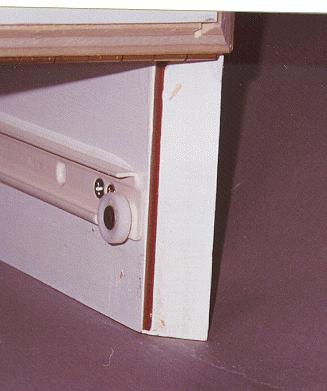
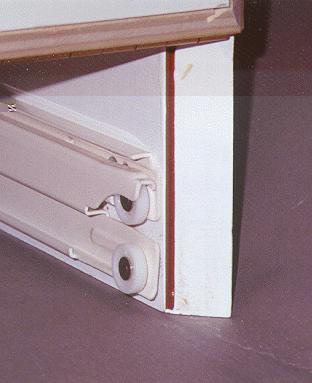
Next, take the right drawer slide, marked
"R" with the wheel pointing up and to the rear of the light source, the
"R" will be pointing to the outside of the unit, open the door, and place
the slide so the wheel fits in the groove in the rear of the slide attached
to the unit. You have to turn slide up slightly at an angle, then
and it will lay flat in the fixed slide. When it is flat, it will
roll freely back and forth. Slide should sit in fixed slide as illustrated
in the two photos below.
|
|
Then, pull it forward until it stops, then pull it a little more to lock it in place in a detented position as shown in the photo below.
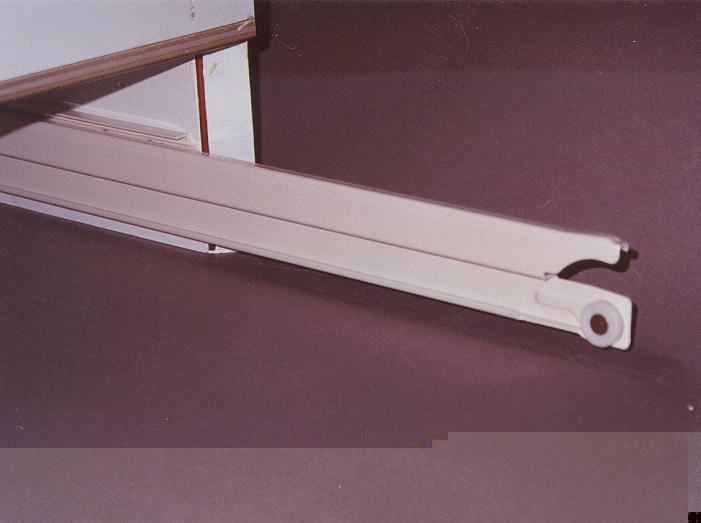
Repeat the same thing for the left side,
with the "L" facing outward. With both slides sticking out, place
the vacuum frame drawer back rollers in the curved part of the slides
sticking out as shown below from the outside and inside.
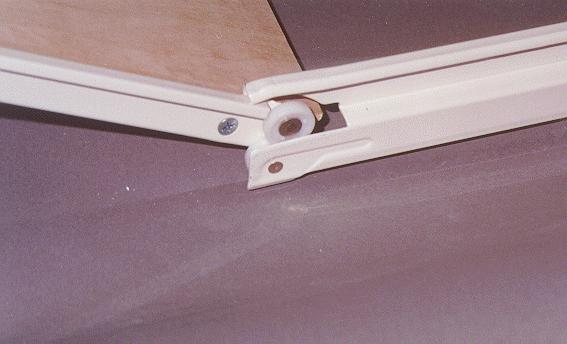 |
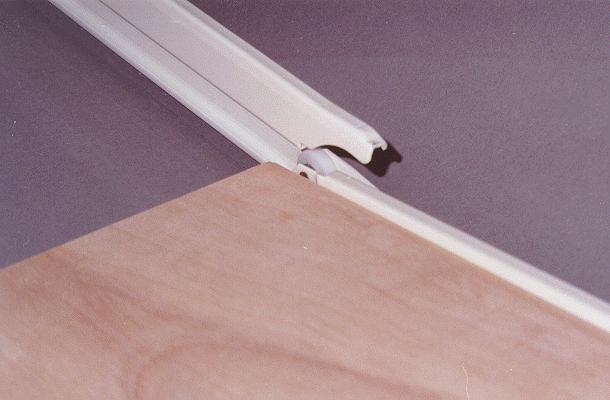
Once the rollers are in the curved sections,
you can push the drawer back, while lifting the drawer up slightly until
the rollers pass the orange locks.
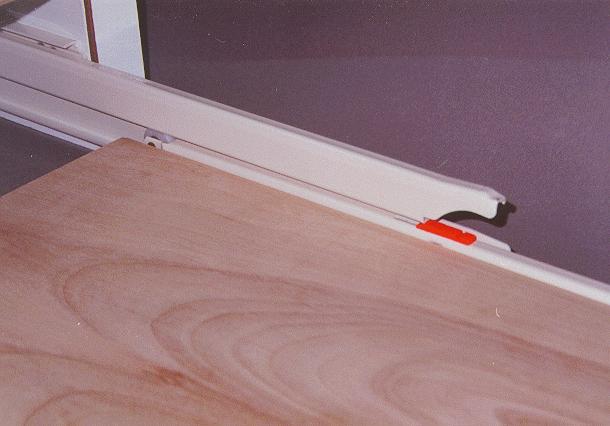
This should slide freely and not bind, and
the middle slide should stay in the out position until the orange lock
is passed. Once the rollers on drawer have passed the orange lock,
it should roller freely and de-latch from the detents. About half
way through pushing in the drawer, some resistance will be felt, this is
normal, continue to push firmly to get past the orange locks. Once
the drawer moves freely, attach the handle to the under side of the drawer
in thge predrilled holes
Vacuum Frame Operation
Attach the Vacuum hose to the drawer and the vacuum pump. Plug the vacuum pump into the auxiliary switch provided and plug it into an outlet. Make sure the GFIC is set on the switch outlet.
When you pull out the drawer, always pull it out to the locked position before you open the vacuum frame. To open the vacuum frame to place your negative and paper on the mat, lift up on the glass frame until it "locks" in the up position or stays in the up position. To unlock from the up position, lift up slightly to unlock the catches. If your unit has two gas spring cylinders it will not be necessary to lift up to unlock as there are no catches. Always gently lower the glass frame onto the mat seal. Do not allow the glass frame to drop on to the mat seal or damage will occur to the seal.
There is no big locking clamp required for the vacuum frame, like you have may have encountered at teaching institutions. Just turn on the pump with the switch and it should draw down, or you may want to put a little pressure on the front of the frame if it is slow to draw down. Actually, the mat with your paper and negative pulls up to the glass.
If your vacuum pump has a valve (16X20 units) , close the valve to apply vacuum and open the valve to release the vacuum. The vacuum pump operates during the entire exposure time while the vacuum frame is under the bank of UV lights. If the vacuum frame pulls down too fast, or damages your papers, you can start the pump with the valve open then slowly close the valve.
If your vacuum pump DOES NOT have a valve
(20X24 and larger units), simply start the pump with the auxiliary
switch provided to draw down the vacuum frame. The vacuum pump operates
during the entire exposure time while the vacuum frame is under the bank
of UV lights. Once your exposure is complete, turn off the vacuum
pump, and the vacuum will release the frame after about 15 seconds so that
you can lift the frame to remove your exposed print and negative.
than a new unit.